Skip to content
  • Categories
  • Tags
  • Popular
  • Users
  • Groups
Skins
  • Light
  • Brite
  • Cerulean
  • Cosmo
  • Flatly
  • Journal
  • Litera
  • Lumen
  • Lux
  • Materia
  • Minty
  • Morph
  • Pulse
  • Sandstone
  • Simplex
  • Sketchy
  • Spacelab
  • United
  • Yeti
  • Zephyr
  • Dark
  • Cyborg
  • Darkly
  • Quartz
  • Slate
  • Solar
  • Superhero
  • Vapor

  • Default (Flatly)
  • No Skin
Collapse

Odoo 中文社区

  1. Home
  2. Categories
  3. Odoo 新手求助
  4. Window Server 2008 SP2 安装完Odoo 13, 为什么打不开启动页面 http://localhost:8069 ?

Window Server 2008 SP2 安装完Odoo 13, 为什么打不开启动页面 http://localhost:8069 ?

Scheduled Pinned Locked Moved Odoo 新手求助
6 Posts 2 Posters 2.7k Views 1 Watching
  • Oldest to Newest
  • Newest to Oldest
  • Most Votes
Reply
  • Reply as topic
Log in to reply
This topic has been deleted. Only users with topic management privileges can see it.
  • E Offline
    E Offline
    ekylin
    wrote on last edited by
    #1

    Window Server 2008 SP2 安装完Odoo 13, 为什么打不开启动页面 http://localhost:8069 ?
    在另外一台PC Window10 上安装没问题,不知道什么原因

    1 Reply Last reply
    0
    • 卓忆卓 Offline
      卓忆卓 Offline
      卓忆
      wrote on last edited by 卓忆
      #2

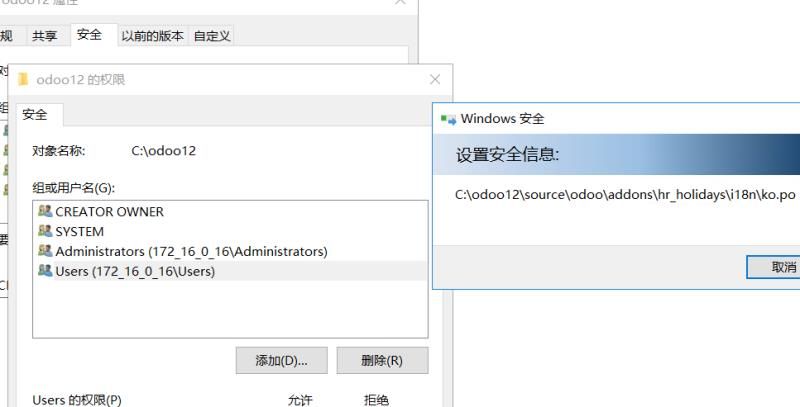
      server版本的,安装的目录 可能要设置下权限;
      比如安装到 odoo13目录,这个目录 给 user 所有的权限 。
      odoo目录权限.jpg

      恬淡

      1 Reply Last reply
      0
      • E Offline
        E Offline
        ekylin
        wrote on last edited by
        #3

        谢谢, 这个坑比较折腾,查看了安全权限,里边已经有User.
        安装过程都没问题,系统服务里Odoo和PostgreSQL都有运行

        1 Reply Last reply
        0
        • E Offline
          E Offline
          ekylin
          wrote on last edited by
          #4

          Odoo Log 显示没问题,网络防火墙也关闭,就是死活打不开

          2020-05-14 05:01:32,067 4276 INFO ? odoo: Odoo version 13.0-20200510
          2020-05-14 05:01:32,067 4276 INFO ? odoo: Using configuration file at D:\Server\Odoo\server\odoo.conf
          2020-05-14 05:01:32,067 4276 INFO ? odoo: addons paths: ['D:\Server\Odoo\server\odoo\addons', 'c:\users\administrator\appdata\local\openerp s.a\odoo\addons\13.0', 'd:\server\odoo\server\odoo\addons']
          2020-05-14 05:01:32,067 4276 INFO ? odoo: database: openpg@localhost:5432
          2020-05-14 05:01:32,597 4276 INFO ? odoo.addons.base.models.ir_actions_report: Will use the Wkhtmltopdf binary at D:\Server\Odoo\thirdparty\wkhtmltopdf.exe
          2020-05-14 05:01:32,925 4276 INFO ? odoo.service.server: HTTP service (werkzeug) running on SERVER:8069

          1 Reply Last reply
          0
          • E Offline
            E Offline
            ekylin
            wrote on last edited by
            #5

            Netstat -a 有5432端口侦听,没看到8069端口侦听

            1 Reply Last reply
            0
            • E Offline
              E Offline
              ekylin
              wrote on last edited by
              #6

              @ekylin 在 Window Server 2008 SP2 安装完Odoo 13, 为什么打不开启动页面 http://localhost:8069 ? 中说:

              werkzeug web service 在运行,为什么没有在netstat -a 看不到端口?

              1 Reply Last reply
              0

              Hello! It looks like you're interested in this conversation, but you don't have an account yet.

              Getting fed up of having to scroll through the same posts each visit? When you register for an account, you'll always come back to exactly where you were before, and choose to be notified of new replies (either via email, or push notification). You'll also be able to save bookmarks and upvote posts to show your appreciation to other community members.

              With your input, this post could be even better 💗

              Register Login
              Reply
              • Reply as topic
              Log in to reply
              • Oldest to Newest
              • Newest to Oldest
              • Most Votes


              • Login

              • Don't have an account? Register

              • Login or register to search.
              • First post
                Last post
              0
              • Categories
              • Tags
              • Popular
              • Users
              • Groups