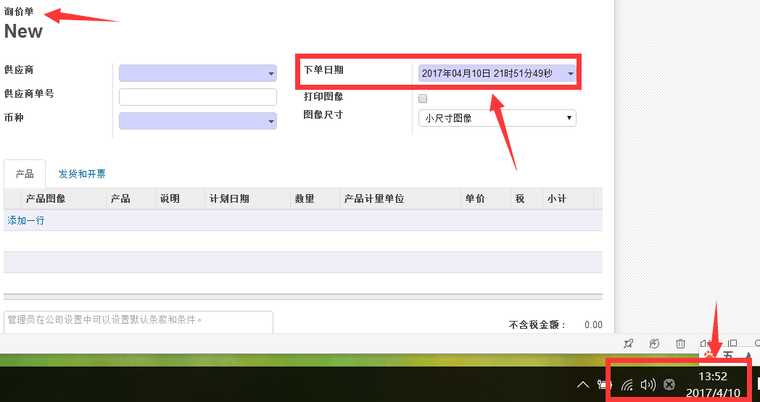
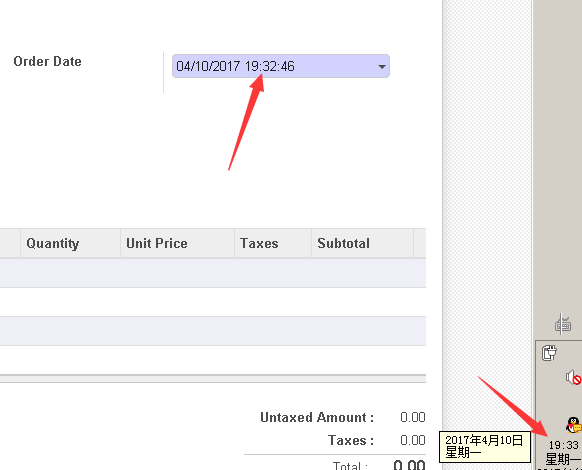
win1- + odoo10中,新建订单时间快了8小时,要如何设置
-
检查一下操作用户的时区设置,在用户的Preference设置里
-
检查一下操作用户的时区设置,在用户的Preference设置里
@digitalsatori
odoo的首选项,选择 asia/shanghai 上海时区,这个有错嘛 -
你这个错得有意思。我估计在数据库里就已经不是UTC时间而是UTC+8的时间,因为你显示出来的是UTC+16的时间。说明客户端是在UTC+8的基础上+8小时了。
有安装过其它什么模块吗?如果方便的话,安装个PGADMIN,用它看看数据库里的记录。
-
这个问题的原因是‘有些模块没有将时间以utc格式存回数据库’
-
这个问题的原因是‘有些模块没有将时间以utc格式存回数据库’
@jeffery 在 win1- + odoo10中,新建订单时间快了8小时,要如何设置 中说:
这个问题的原因是‘有些模块没有将时间以utc格式存回数据库’
@jeffery 去扫了一下10.0代码,仍然有一些你提到的系统默认值的时差问题。


不过楼主提到的问题,好象是那些magic field的,与您提到的问题不一样,应该是另有原因。不知道有没有装了第三方模块。


Hello! It looks like you're interested in this conversation, but you don't have an account yet.
Getting fed up of having to scroll through the same posts each visit? When you register for an account, you'll always come back to exactly where you were before, and choose to be notified of new replies (either via email, or push notification). You'll also be able to save bookmarks and upvote posts to show your appreciation to other community members.
With your input, this post could be even better 💗
Register Login